-
youtube.com > Secure Remote Access to SSH & RDP From Your Browser
-
- Adds scripts to help set up the database schemas for you in the process of deployment
-
In the code server I had setup next to my custom compose yamls, I git cloned the above repo
-
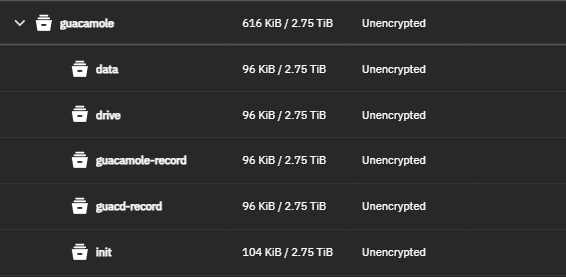
Had to create all of the below datasets
-
Permission the datasets
-
For the
datadataset - For the
initdataset- .
- I REALLY don’t understand why, but I had to give permissions to the data and init datasets in special ways. Something to do with permissions mapping
chown -R root:70 /mnt/personal/APP_Configs/guacamole/initchmod -R 755 /mnt/personal/APP_Configs/guacamole/init
-
-
Had to also initialize the database schema via TrueNAS shell
- change directories to the init dataset
- Run the command mentioned here
- https://github.com/boschkundendienst/guacamole-docker-compose/tree/master?tab=readme-ov-file#preparesh
- Match the current guacamole version
Copy the below compose file
####################################################################################
# docker-compose file for Apache Guacamole
# created by PCFreak 2017-06-28
#
# Apache Guacamole is a clientless remote desktop gateway. It supports standard
# protocols like VNC, RDP, and SSH. We call it clientless because no plugins or
# client software are required. Thanks to HTML5, once Guacamole is installed on
# a server, all you need to access your desktops is a web browser.
####################################################################################
#
# What does this file do?
#
# Using docker-compose it will:
#
# - create a network 'guacnetwork_compose' with the 'bridge' driver.
# - create a service 'guacd_compose' from 'guacamole/guacd' connected to 'guacnetwork_compose'
# - create a service 'postgres_guacamole_compose' (1) from 'postgres' connected to 'guacnetwork_compose'
# - create a service 'guacamole_compose' (2)  from 'guacamole/guacamole/' conn. to 'guacnetwork_compose'
# - create a service 'nginx_guacamole_compose' (3) from 'nginx' connected to 'guacnetwork_compose'
#
# (1)
#  DB-Init script is in './init/initdb.sql' it has been created executing
#  'docker run --rm guacamole/guacamole /opt/guacamole/bin/initdb.sh --postgresql > ./init/initdb.sql'
#  once.
#  DATA-DIR       is in './data'
#  If you want to change the DB password change all lines with 'POSTGRES_PASSWORD:' and
#  change it to your needs before first start.
#  To start from scratch delete './data' dir completely
#  './data' will hold all data after first start!
#  The initdb.d scripts are only executed the first time the container is started
#  (and the database files are empty). If the database files already exist then the initdb.d
#  scripts are ignored (e.g. when you mount a local directory or when docker-compose saves
#  the volume and reuses it for the new container).
#
#  !!!!! MAKE SURE your folder './init' is executable (chmod +x ./init)
#  !!!!! or 'initdb.sql' will be ignored!
#
#  './data' will hold all data after first start!
#
# (2)
#  Make sure you use the same value for 'POSTGRES_USER' and 'POSTGRES_PASSWORD'
#  as configured under (1)
#
# (3)
#  ./nginx/templates folder will be mapped read-only into the container at /etc/nginx/templates
#  and according to the official nginx container docs the guacamole.conf.template will be
#  placed in /etc/nginx/conf.d/guacamole.conf after container startup.
#  ./nginx/ssl will be mapped into the container at /etc/nginx/ssl
#  prepare.sh creates a self-signed certificate. If you want to use your own certs
#  just remove the part that generates the certs from prepare.sh and replace
#  'self-ssl.key' and 'self.cert' with your certificate.
#  nginx will export port 8443 to the outside world, make sure that this port is reachable
#  on your system from the "outside world". All other traffic is only internal.
#
#  You could remove the entire 'nginx' service from this file if you want to use your own
#  reverse proxy in front of guacamole. If doing so, make sure you change the line
#   from     - 8080/tcp
#   to       - 8080:8080/tcp
#  within the 'guacamole' service. This will expose the guacamole webinterface directly
#  on port 8080 and you can use it for your own purposes.
#  Note: Guacamole is available on :8080/guacamole, not /.
#
# !!!!! FOR INITAL SETUP (after git clone) run ./prepare.sh once
#
# !!!!! FOR A FULL RESET (WILL ERASE YOUR DATABASE, YOUR FILES, YOUR RECORDS AND CERTS) DO A
# !!!!!  ./reset.sh
#
#
# The initial login to the guacamole webinterface is:
#
#     Username: guacadmin
#     Password: guacadmin
#
# Make sure you change it immediately!
#
# version            date              comment
# 0.1                2017-06-28        initial release
# 0.2                2017-10-09        minor fixes + internal GIT push
# 0.3                2017-10-09        minor fixes + public GIT push
# 0.4                2019-08-14        creating of ssl certs now in prepare.sh
#                                      simplified nginx startup commands
# 0.5                2023-02-24        nginx now uses a template + some minor changes
# 0.6                2023-03-23        switched to postgres 15.2-alpine
# 0.61               2024-07-27        fix networks + version 3.0
# 0.62               2024-07-27        fix
# 0.63               2025-07-02        fixed postgres environment vars
#                                      pinned guacamole and guacd to 1.6.0
#####################################################################################

#the attribute `version` is obsolete, it will be ignored, please remove it to avoid potential confusion
#version: '3.0'

# networks
# create a network 'guacnetwork_compose' in mode 'bridged'
networks:
  guacnetwork_compose:
    driver: bridge

# services
services:
  # guacd
  guacd:
    container_name: guacd_compose
    image: guacamole/guacd:1.6.0
    networks:
      - guacnetwork_compose
    restart: always
    volumes:
    - /mnt/personal/APP_Configs/guacamole/drive:/drive:rw
    - /mnt/personal/APP_Configs/guacamole/guacd-record:/record:rw
  # postgres
  postgres:
    container_name: postgres_guacamole_compose
    environment:
      PGDATA: /var/lib/postgresql/data/guacamole
      POSTGRES_DB: guacamole_db
      POSTGRES_PASSWORD: 'CUSTOM PASSWORD HERE'
      POSTGRES_USER: guacamole_user
    image: postgres:15.2-alpine
    networks:
      - guacnetwork_compose
    restart: always
    volumes:
    - /mnt/personal/APP_Configs/guacamole/init:/docker-entrypoint-initdb.d:z
    - /mnt/personal/APP_Configs/guacamole/data:/var/lib/postgresql/data:Z

  # guacamole
  guacamole:
    container_name: guacamole_compose
    group_add:
      - "1000"
    depends_on:
    - guacd
    - postgres
    environment:
      GUACD_HOSTNAME: guacd
      POSTGRESQL_DATABASE: guacamole_db
      POSTGRESQL_HOSTNAME: postgres
      POSTGRESQL_PASSWORD: 'CUSTOM PASSWORD HERE'
      POSTGRESQL_USERNAME: guacamole_user
      RECORDING_SEARCH_PATH: /record
    image: guacamole/guacamole:1.6.0
    networks:
      - guacnetwork_compose
    volumes:
      - /mnt/personal/APP_Configs/guacamole/guacamole-record:/record:rw
    ports:
## enable next line if not using nginx
##    - 8080:8080/tcp # Guacamole is on :8080/guacamole, not /.
## enable next line when using nginx
    - 8081:8080/tcp
    restart: always
####################################################################################
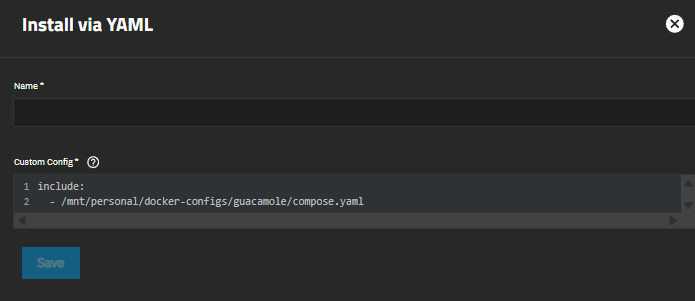
Save and run in TrueNAS Apps > Custom YAML